Run creators as a system, and see which ones really sell
Creators are the fastest way to turn content into orders — and the easiest place to lose money. SellerTiger runs the whole loop: find and screen creators, agree deals inside your margin rules, ship approved samples, track every post, and attribute the orders each creator brings against what you spent.
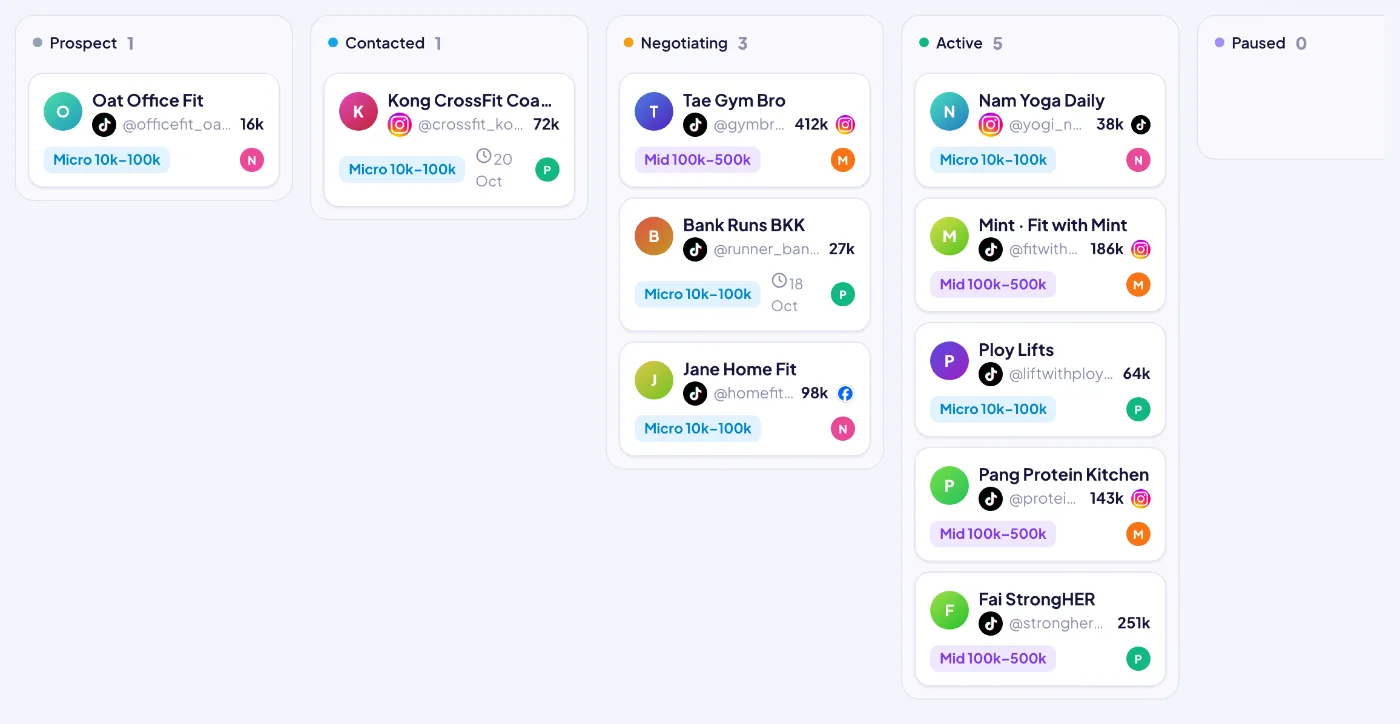
Creator pipeline: prospect → contacted → negotiating → active, drag a card to move it.
Highlights
Creators, deals, samples, posts and the orders they bring — with cost ratio and approvals.
01
Register before the first DM
Every creator is registered once, with any number of platform accounts (one primary). A live duplicate check stops two people messaging the same creator; tier is set automatically from the largest follower count (nano to mega).
02
Screening and AI fit score
Niche, source (affiliate data, free-sample request, search, competitor video, referral) and a screening rule — average views of the last 10 posts at least 10% of followers or 1,000. AI gives a fit score with reasons, risks, best products and a content angle.
03
Pipeline and contact log
Prospect → contacted → negotiating → active → paused → do not use, on a drag-and-drop board. Each contact logs channel, purpose and result; the next follow-up date becomes a reminder task and shows on the calendar.
04
DM templates that fill themselves
A team library of outreach templates (first DM, follow-up, day 3 delivery check, day 7 feedback, day 14 post reminder, long-term offer) with variables such as {name}, {product} and {commission} filled from real data — and AI to personalize them.
05
Deals inside your margin rules
Commission only, sample + commission, paid, or fee + commission, with separate TikTok and Shopee rates. A rule check shows the maximum commission that keeps each channel above its net floor after platform fees; clearance SKUs are blocked and paid fees need an approver.
06
Samples with approval and a warehouse queue
A sample request goes to approval; approval books the sample cost in the ledger and creates a pack-and-ship task for the warehouse. Statuses run requested → to pack → packed → shipped → delivered → posted.
07
Posts tracked automatically
Log the post link, SKU and deal; the sample closes itself. Views, likes, comments, shares and saves are read from the public post page daily (AI reads it when needed) — post due dates and overdue posts are flagged.
08
Orders attributed, with honesty about certainty
Manual mark (strongest) > platform affiliate data or an imported affiliate report (100%) > the creator’s @handle in the order note (80%) > estimated from the post window, where confidence is the share of orders above the SKU’s normal rate. Estimates are always labeled.
09
Commission, spend and cost ratio
Commission uses the platform figure, or order value × the agreed rate, or the ledger once paid. Spend = commission + samples + fees from the ledger; cost ratio = spend ÷ creator GMV, compared with the month’s target.
10
Monthly targets synced to OKR
Targets per metric and owner, with actuals calculated from KOL data. “Sync to OKR” turns them into key results — one per month, or one per quarter summing the months — and keeps them updated.
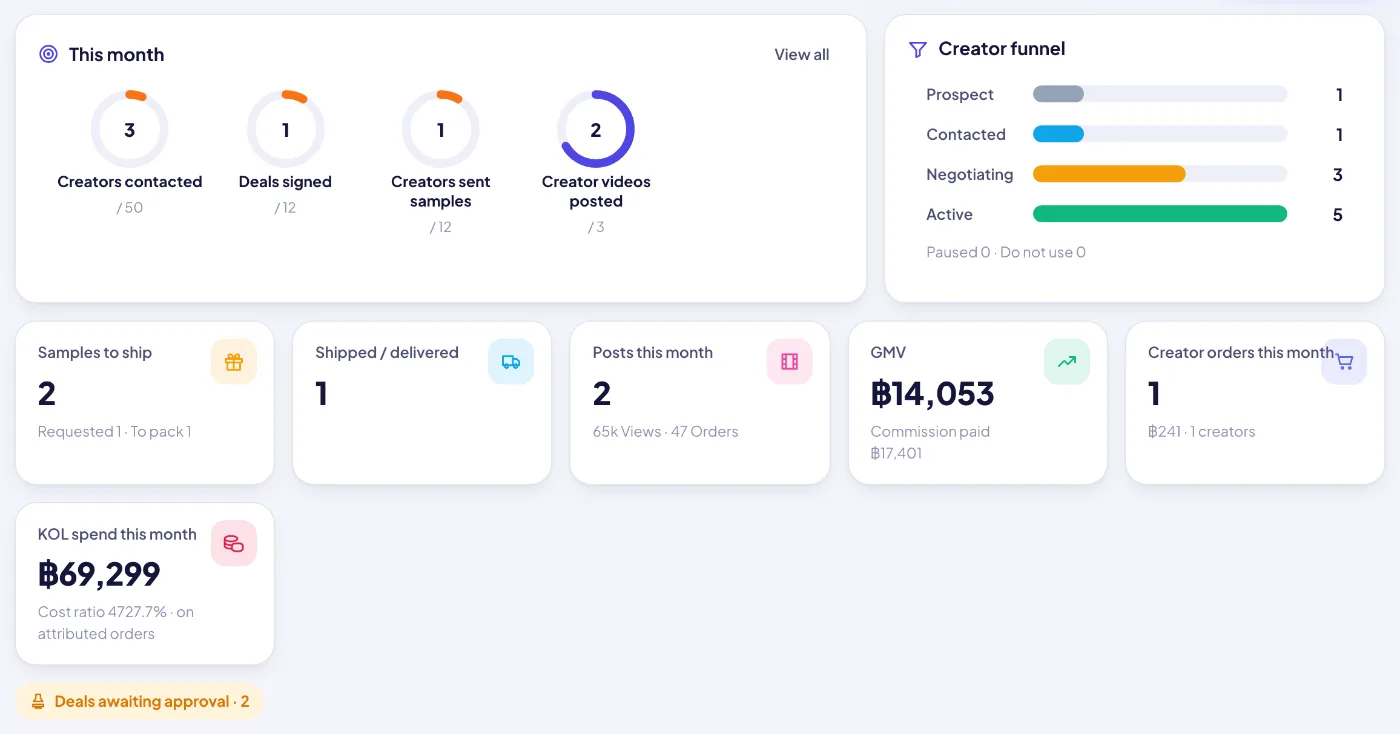
This month: creator funnel, samples to ship, posts, GMV, commission and what is overdue.
KOL workflow
This month: creator funnel, samples to ship, posts, GMV, commission and what is overdue.
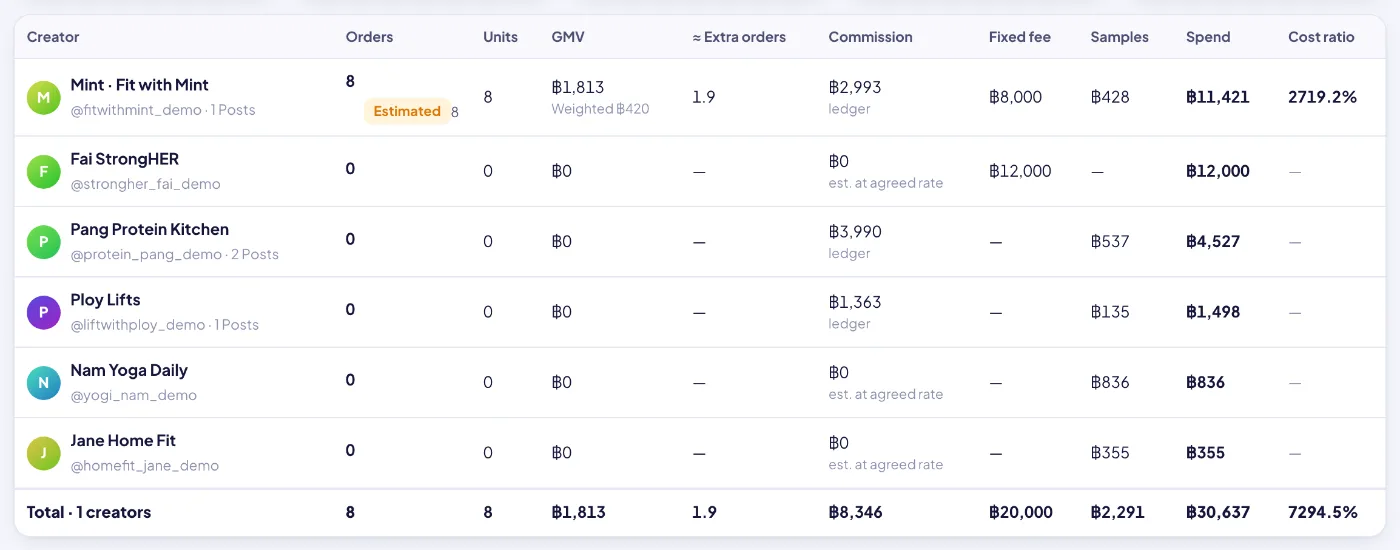
Creator orders: orders, GMV, commission, spend and cost ratio each creator brought in.
KOL workflow
Creator orders: orders, GMV, commission, spend and cost ratio each creator brought in.
KOL workflow
How it works
1Find
Register and screen creators; AI scores the fit and drafts the first DM.
2Agree
Log contacts, create a deal inside the margin rules and send it for approval.
3Ship
Approved samples go to the warehouse queue and are followed up on day 3, 7 and 14.
4Track
Posts are logged and their numbers fetched; overdue posts are flagged.
5Attribute
Orders are linked to creators and set against commission, samples and fees.
KOL workflow
What each panel tells you
Creator funnel
Creators at each stage this month against target.
Creator orders and GMV
Attributed orders, units and GMV, with the weighted number for estimates (≈ extra orders).