One price logic for every channel, protected by margin floors
Every marketplace charges different fees, commissions and vouchers, so the same list price leaves very different profit. The price system turns them into one logic: what the platform takes, what you decide to spend, and what real orders show. Each SKU is then checked against a net floor.
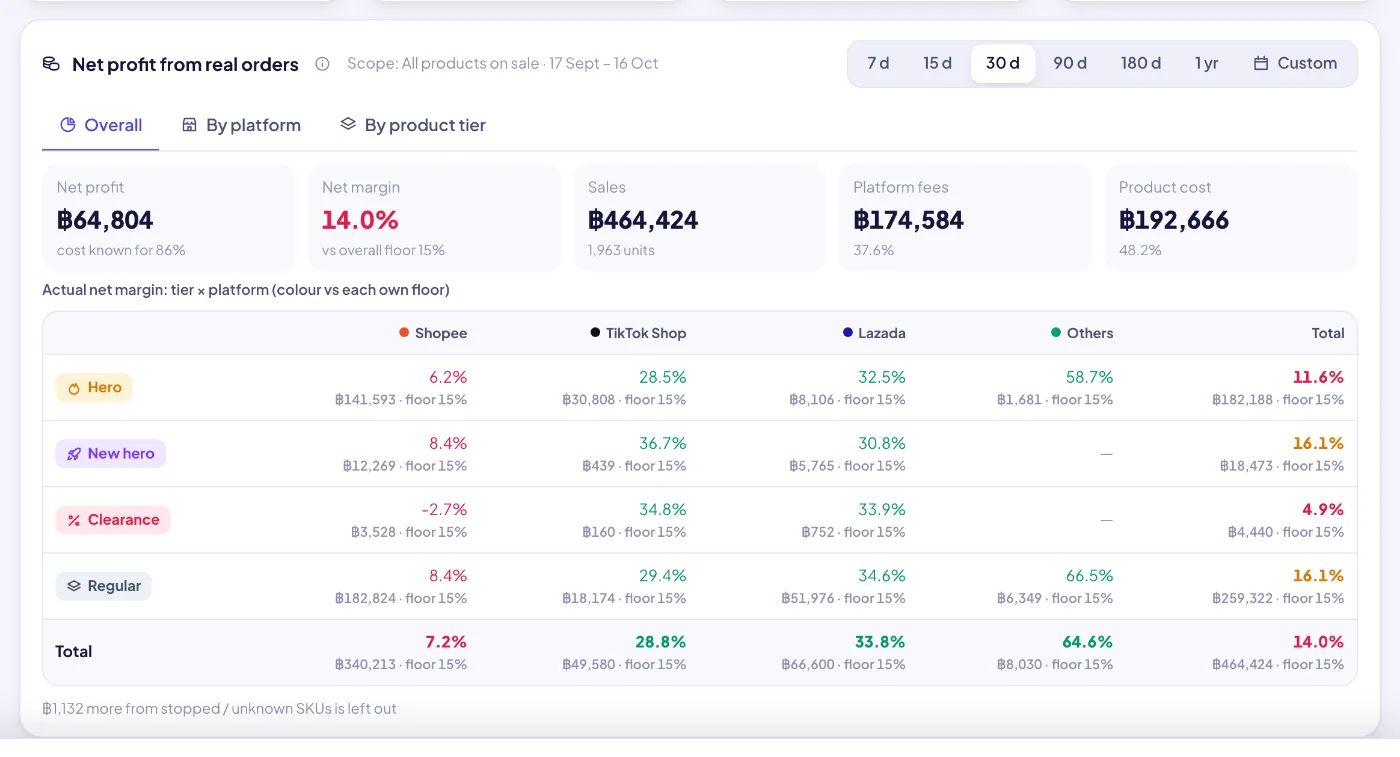
Net profit from real orders by platform: sales, fees, product cost, net and margin against the floor.
Highlights
Fee-aware prices, net-margin floors and approved price changes for every channel.
01
Fee-aware net margin
Net = list price × (1 − platform fee − creator commission − subsidy − ads) − fixed fee per order − unit cost. Each platform uses its own model, for example a targeted creator commission replaces the open rate instead of stacking on it.
02
Three bands: platform, strategy, actuals
① What the platform charges (fees and tax, kept in Settings and read-only here). ② What you decide (vouchers, coins, website discount, creator commission per order, and ads as a budget). ③ Actual rates worked out from the last 30 or 90 days of orders.
03
Strategy defaults with inheritance
Set defaults per platform, with optional per-tier overrides, on/off switches and an ads budget turned into a % of price. A SKU inherits them unless it has its own value. Grey means inherited.
04
Plan vs actual, never overwritten
Actual discount, creator rate, ads share and platform fee are compared with the plan and turn red when they exceed your tolerance. Actuals only verify the plan, they never change it.
05
Net floors per platform × tier
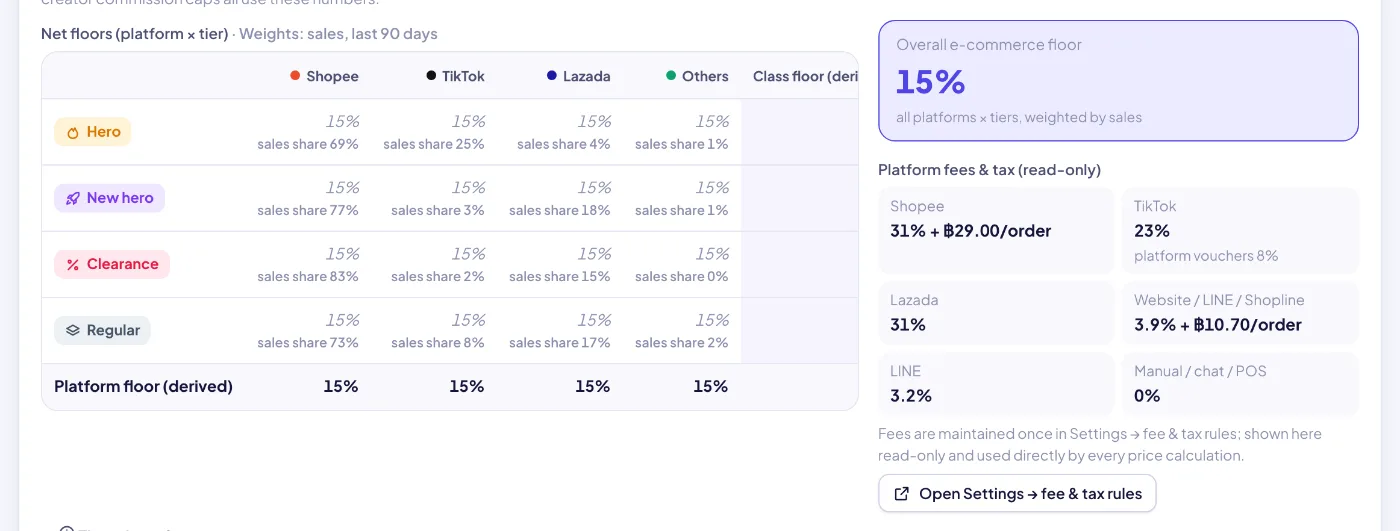
Set a floor for each platform and tier (hero, new hero, regular, clearance). The class, platform and overall e-commerce floors are derived and weighted by recent sales. An empty cell uses the fallback floor.
06
Floors guard everything
The same floors drive pricing issue flags, price-change pre-checks, the overview health check, the campaign minimum price, the creator commission cap and Home reminders.
07
Price changes go through approval
Click any price cell to request a change. Pricing managers can apply it directly. Everyone else sends a price-change approval with the issues it would cause. Every change is kept in the price history with its approval.
08
Re-check at actual costs
For each SKU it checks net margin vs floor, selling price vs floor price, campaign floor vs floor price and hero price parity (buyers pay the same on Shopee and TikTok), using real costs from the last 30 or 90 days.
09
Buyer-paid price trend
Daily average, median, min and max unit price per platform, against price anchors: list price, SRP, floor price and campaign price.
10
Real-order profit dashboard
Net profit from real orders overall, by platform and by tier, with a tier × platform margin matrix colored against each cell’s own floor. You can export the price table with your current filters.
Price standards: a net-profit floor for every platform × tier, with tier, platform and overall floors derived automatically and weighted by sales.
Price system
Price standards: a net-profit floor for every platform × tier, with tier, platform and overall floors derived automatically and weighted by sales.
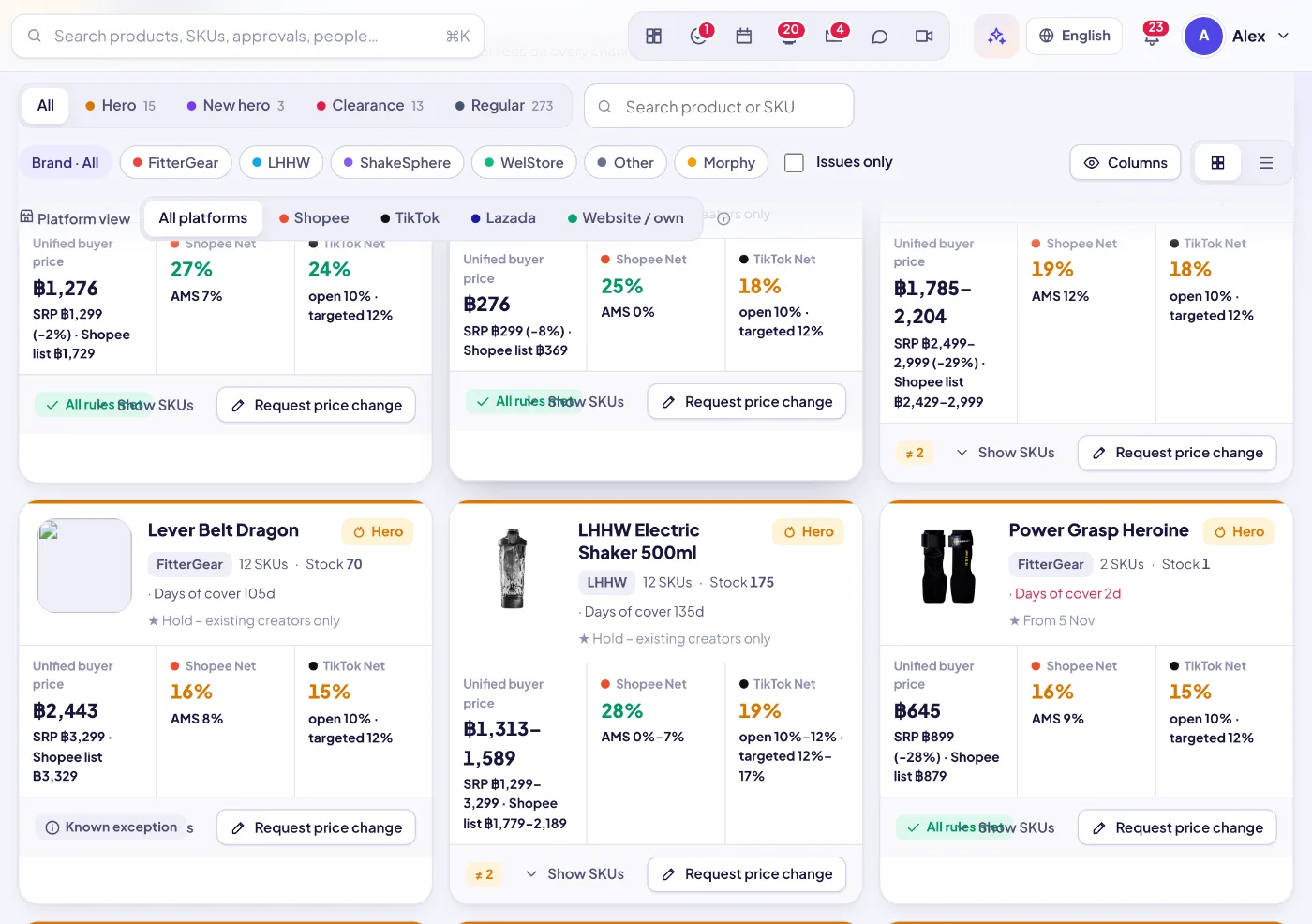
The SKU price panel, grouped by tier: every SKU’s prices per platform, net margins and discount vs SRP.
Price system
The SKU price panel, grouped by tier: every SKU’s prices per platform, net margins and discount vs SRP.
Price system
How it works
1Platform fees
Keep each platform’s fees and tax once in Settings.
2Your strategy
Set default vouchers, commission and ads per platform and tier.
3Floors
Set net floors per platform × tier. Every check uses them at once.
4Price and approve
Request changes per SKU, pre-checked against the floors, then approved and logged.
5Verify with orders
Compare plan vs actual and re-check margins at real costs.