
Connect a TikTok Shop (Partner Center · custom app)
Authorize your TikTok Shop in SellerTiger with the custom app you created in TikTok Shop Partner Center. This is the seller shop connection; posting short videos is a separate connection, see Connect TikTok for posting.
Note (checked 2026-10-17): Authorization and Test connection work today; the direct TikTok Shop order feed isn't live yet. Orders keep coming from TikTok Shop export files or BigSeller, and Data Center shows "authorized · feed pending".
Before you start
- Who does this: someone with level-4 Settings permission in SellerTiger (the founder by default). On the TikTok side, use the shop's main account.
- Brands & channels: the brand already has a TikTok Shop sales channel (not a TikTok short-video account).
- Plan: each authorized shop uses one slot.
- Request all permissions at once: if you add permissions later, the shop has to be authorized again.
- Fixed market: a developer account's market is set at registration, and one app serves one market. For a Thai shop, choose Thailand.
Step 1 · Credentials: create a custom app and copy the App Key, App Secret and Service ID
- Sign in at partner.tiktokshop.com and register as a developer with a seller in-house identity.
- Go to App & Service → Create app, choose Custom app, and set the target market to Thailand. The category and market can't be changed after creation.
- Open the app details and copy the App Key, App Secret and the Service ID under the app name (used by the new authorization flow; it's different from the App Key).
Step 2 · Encryption / webhook: not needed
SellerTiger doesn't use TikTok Shop push notifications.
Step 3 · Permissions: select the read scopes
In the app's API scopes / Manage API, select read access for Order, Product, Inventory / Logistics and Finance, plus Authorization / Shop (to read the authorized shops). Save.
Step 4 · Callback: add the shop in SellerTiger and fill in the Redirect URL
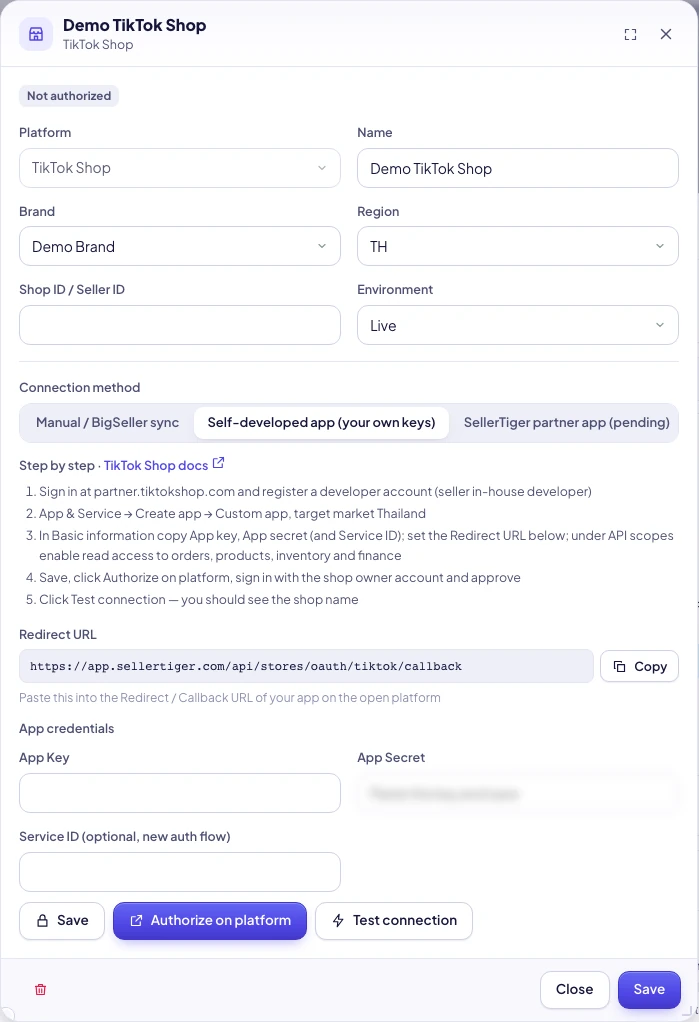
- In SellerTiger, go to Settings → Connections → TikTok Shop → Add & connect (or Add shop).
- Fill in Name, Brand, Region (TH) and Environment (Live).
- Under Connection method, choose Self-developed app (your own keys) → Save.
- Under App credentials, enter the App Key, App Secret and Service ID (optional, new auth flow) → Save. We recommend filling in the Service ID.
- Copy the Redirect URL:
https://app.sellertiger.com/api/stores/oauth/tiktok/callback, enter it as the app's Redirect URL in Partner Center, and save.
Step 5 · Authorize: approve on TikTok Shop
- Click Authorize on platform, sign in with the shop's main account and approve the listed permissions.
- Back in SellerTiger you see "Shop authorized", and the shop shows Authorized. The authorization code is valid for 30 minutes.
Step 6 · Turn on sync: check
- Click Test connection. Seeing the shop name means it worked (SellerTiger also stores the shop cipher, which it needs to read orders later).
- Data Center → Marketplaces → TikTok Shop: shows authorized · feed pending.
- Until the direct feed is live, bring orders in with export files (Orders → Manage orders → Export; Finance → Statements → Export order details) or BigSeller. Exported order numbers are 18 digits: upload the original file directly; don't open and re-save it in Excel.
Tokens and renewal
The access token lasts about 7 days and SellerTiger renews it automatically. If renewal fails, the shop shows Expired; click Re-authorize. Changing the App Key / Secret clears the old tokens.
Troubleshooting
| Message you see | Cause | What to do |
|---|---|---|
| Some required fields are empty | The App Key or App Secret is empty | Fill them in and save |
| Not configured yet — fill in the credentials first | Still set to "Manual / BigSeller sync" | Choose Self-developed app and save the credentials |
| TikTok page says the redirect doesn't match | The Redirect URL in Partner Center differs from SellerTiger's | Paste exactly the same address |
| Platform authorization failed | The authorization code expired, the App Secret is wrong, or the app belongs to another market | Check and re-authorize |
| The platform returned an error · (followed by TikTok's error code and message) | Scopes not selected, or the shop isn't in this app's market | Select the read scopes, then Re-authorize |
| Still can't read data after adding scopes | New scopes take effect only after re-authorization | Re-authorize |
| Couldn’t refresh the platform connection. Authorize it again | The refresh token is no longer valid | Re-authorize |
| You’ve reached your plan’s limit of authorized shops | No shop slots left | Upgrade or buy extra slots |
| SellerTiger partner authorization isn’t open yet — use Self-developed app | You chose partner authorization | Switch to Self-developed app |
Affiliate / creator data
TikTok Shop's Affiliate API is off by default and needs TikTok's approval; SellerTiger doesn't use it yet. To tag creator orders, use Data Center → KOL → Import affiliate order tags (the TikTok Shop affiliate order export, .csv / .xlsx).
SellerTiger partner one-click authorization
SellerTiger is applying for TikTok Shop partner status. Until it's approved, the option shows "pending".
Inside SellerTiger, press the headset button to ask the AI assistant or open a support ticket.