01Several LINE Official Accounts
Each account has its own brand, color, avatar, buy links, UTM defaults and test recipients. Friend count and the monthly message quota are synced from LINE (read-only), so you know how many messages a broadcast will use.
02A composer built for selling
Up to five messages per broadcast: text, image, product-card carousel (up to 12 cards), button card, flex card and sticker. Images are converted to JPG under 1 MB with a ratio check for 1:1 or 1.91:1.
03Product cards with live prices and links
Pick a SKU or a whole product; the price follows the campaign price, then the own-shop price. Links fill themselves: the product’s own link → the account’s LINE shop or website search by product name → the brand channel.
04See it before they do
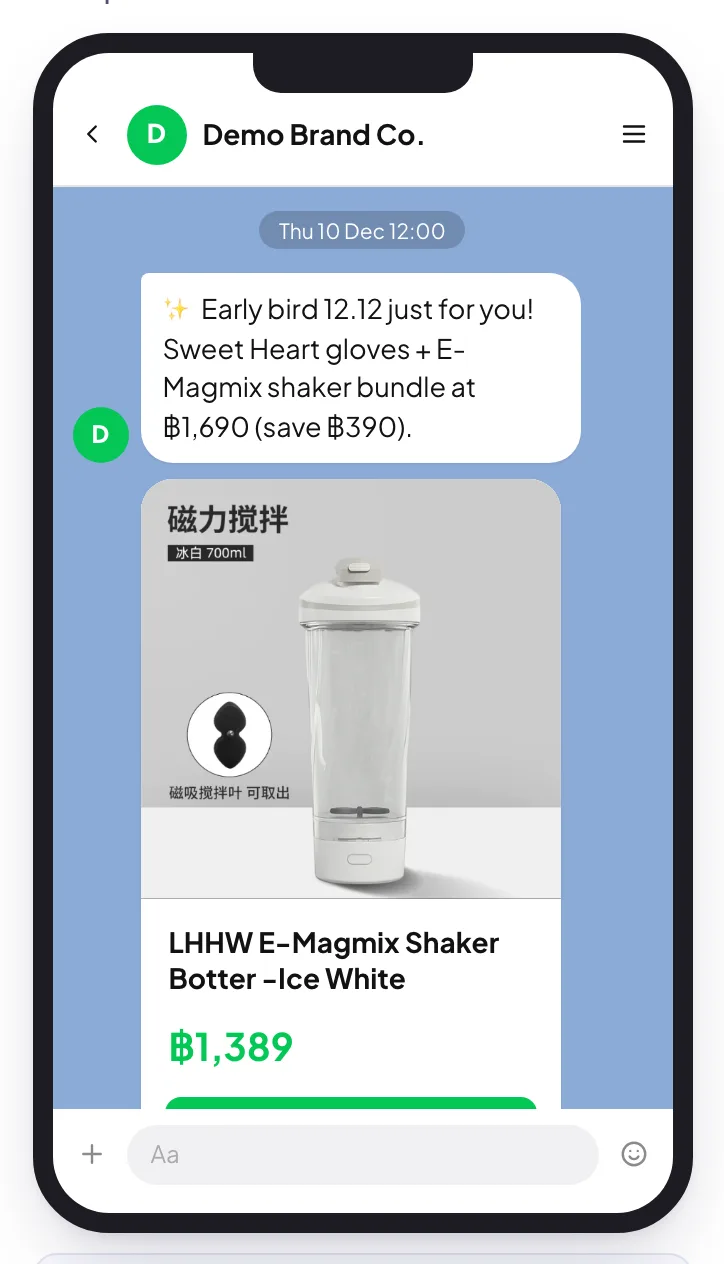
A phone preview renders the broadcast as the sending account, including how it looks in the chat list. Every message is checked against LINE limits (text length, alt text, image size and format, card size, private links) before you can submit.
05Audience and timing
Send to all friends or narrowcast by gender and age, with an estimated reach. Quick times — tonight 20:00, tomorrow 12:00, campaign start, or right after approval — follow when local open rates peak.
06Approval, then the scheduler
Broadcasts are locked once submitted; after approval the scheduler sends them at the set time. Going back to draft needs a new approval, and a send interrupted mid-way is marked failed for a person to decide — never re-sent automatically.
07Sandbox and test mode
Test-send to yourself or up to 20 testers and see the exact Messaging API request JSON with every check. Until live sending is switched on, broadcasts and tests are recorded as dry runs and nothing reaches LINE.
08AI LINE copywriter
Describe the offer; AI writes natural Thai, Chinese or English copy using the sending account, campaign facts, chosen products and prices, and offers shorter variants.
09Results you can trace
UTM tags (source, medium, campaign and SKU) show which broadcast and product brought website visits and orders; delivered, impressions, clicks and media plays are read back from LINE for real sends, next to follower growth.
10Social posts from the same plan
Content items can be scheduled to Facebook Pages, Instagram and TikTok with a caption per network (AI adapts it), TikTok direct post or inbox mode, and the best time to post from your own past results.