Plan the spend that feeds growth, and see what it returns
Content, creators and ads are what bring traffic — and they cost money. Budget & profit puts the plan, the real spend, the money already promised and the e-commerce P&L in one place, filled automatically by the modules where the spending happens.
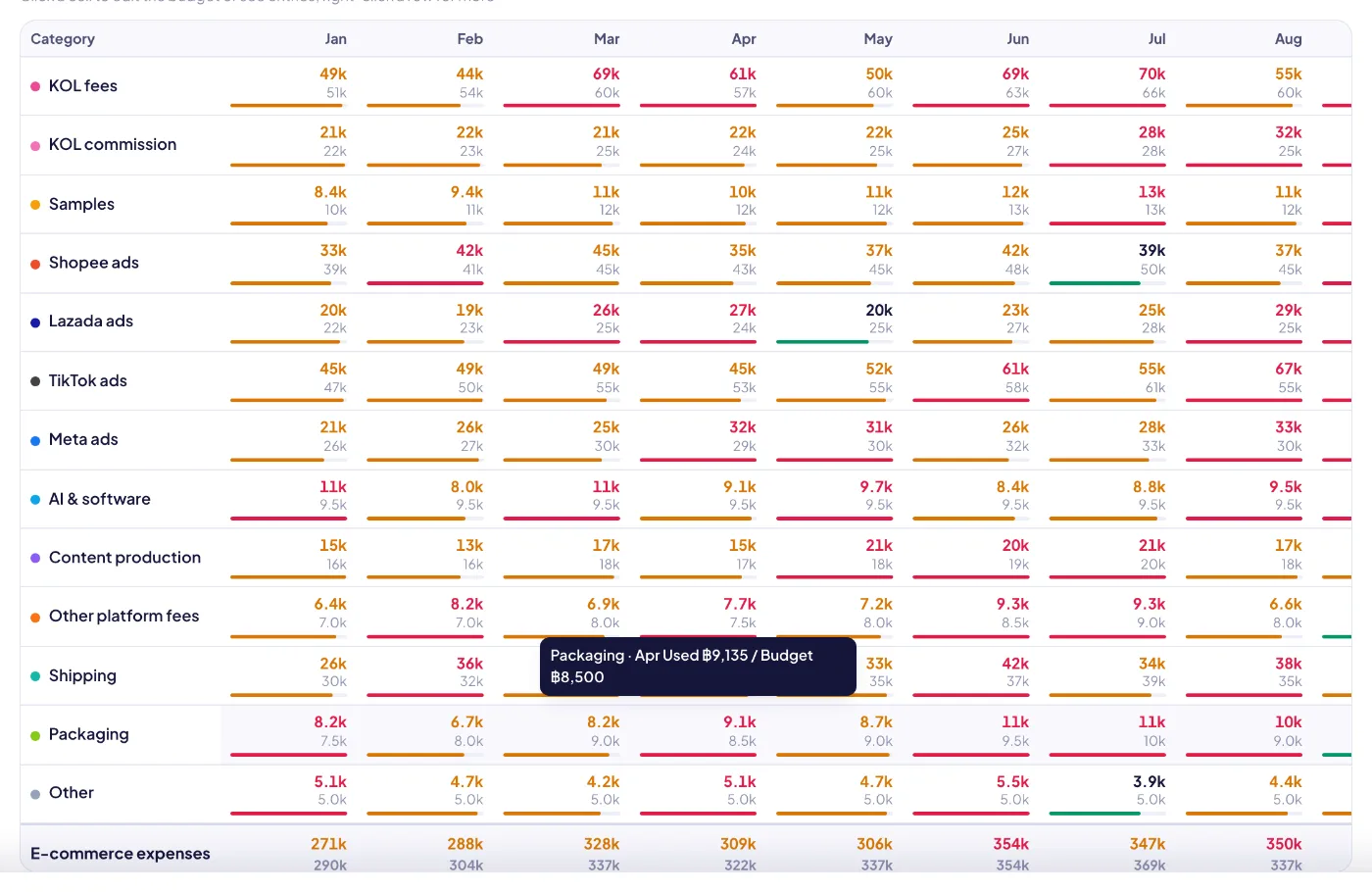
The planning table: every spend category by month, budget against actual plus committed, with cells you click to edit or drill into.
Highlights
Plan spend by category and month, track it, and see what e-commerce really earns.
01
A real planning table
Categories down the side (KOL fees and commission, samples, stock purchasing, inbound freight, ads per platform, AI & software, content production, shipping, packaging…), months across. Each cell shows budget against actual plus committed; click to edit or see the entries behind it.
02
Build next year in minutes
Copy last year’s budget, start from last year’s actuals, adjust everything by a factor, then split a yearly figure evenly or by last year’s seasonality. Overwrite only if you choose to.
03
Committed vs actual
Approved creator deals and campaigns book their money as committed the moment they are approved, so you see what is already promised before the invoice arrives — and the remaining budget is honest.
04
One ledger, filled by the work
Creator deals, samples, purchase orders, campaigns, ad reports and subscriptions post their own ledger rows. Those rows are read-only here and edited at their source; manual expenses get an AI category suggestion.
05
Ad data import
Drop in the ad report exported from Shopee, Lazada or TikTok (Chinese, English or Thai headers). Spend, GMV, orders, impressions and clicks are detected; re-importing the same platform, shop and period replaces the old row instead of doubling it. Spend posts to the ledger.
06
ROAS that means something
Spend, ad GMV and ROAS per platform, a ROAS trend and spend vs GMV, with a target ROAS per row and an optional link to the campaign it belongs to.
07
Subscriptions booked for you
Monthly or yearly tools in any currency with an FX rate: a ledger row is posted on each charge day, charge days appear on the calendar, and stopping one ends future charges.
08
Alerts at 80% and 100%
When a category passes 80% or goes over budget, for the month or the year, budget leaders are notified once — not every time a new row comes in.
09
Forecast and burn
Year-to-date use, remaining budget, daily burn and a year-end forecast per category, so you see trouble months ahead.
10
E-commerce P&L
Revenue (buyer paid) → VAT → platform fees (real, or estimated from your fee rules) → cost of goods → gross profit → spend by group → contribution and margin, by month and by platform, with a profit waterfall. Stock purchasing is shown as cash out, not as an expense.
Ads by platform: spend, ad GMV and ROAS per marketplace, from imported ad reports.
Budget & profit
Ads by platform: spend, ad GMV and ROAS per marketplace, from imported ad reports.
E-commerce P&L: revenue, platform fees, cost of goods, gross profit and contribution after every spend category.
Budget & profit
E-commerce P&L: revenue, platform fees, cost of goods, gross profit and contribution after every spend category.
Budget & profit
How it works
1Plan
Set the yearly budget per category and split it into months — by hand, from last year, or by seasonality.
2Commit
Approving a creator deal or a campaign books its money as committed against the right category.
3Spend
Samples, purchase orders, ad reports and subscriptions post actual spend into the ledger automatically.
4Watch
The table, alerts and forecast show which categories are running hot before the month ends.
5Decide
Read the P&L and ROAS, ask the AI for a budget review, and move money to what actually returns.
Budget & profit
What each panel tells you
Budget / actual / committed
Per category and month: the plan, money already spent, and money promised by approved deals and campaigns. Used = actual + committed.
Remaining
Budget − used, for the month and the full year.
Daily burn · year-end forecast
Average spend per day so far, and where the category lands by year end at that pace.
ROAS
Ad GMV ÷ ad spend, per platform and over time, against the row’s target.
Contribution margin
Revenue after VAT, platform fees, cost of goods and e-commerce spend, ÷ revenue. Excludes company overhead.