
Plans and billing FAQ
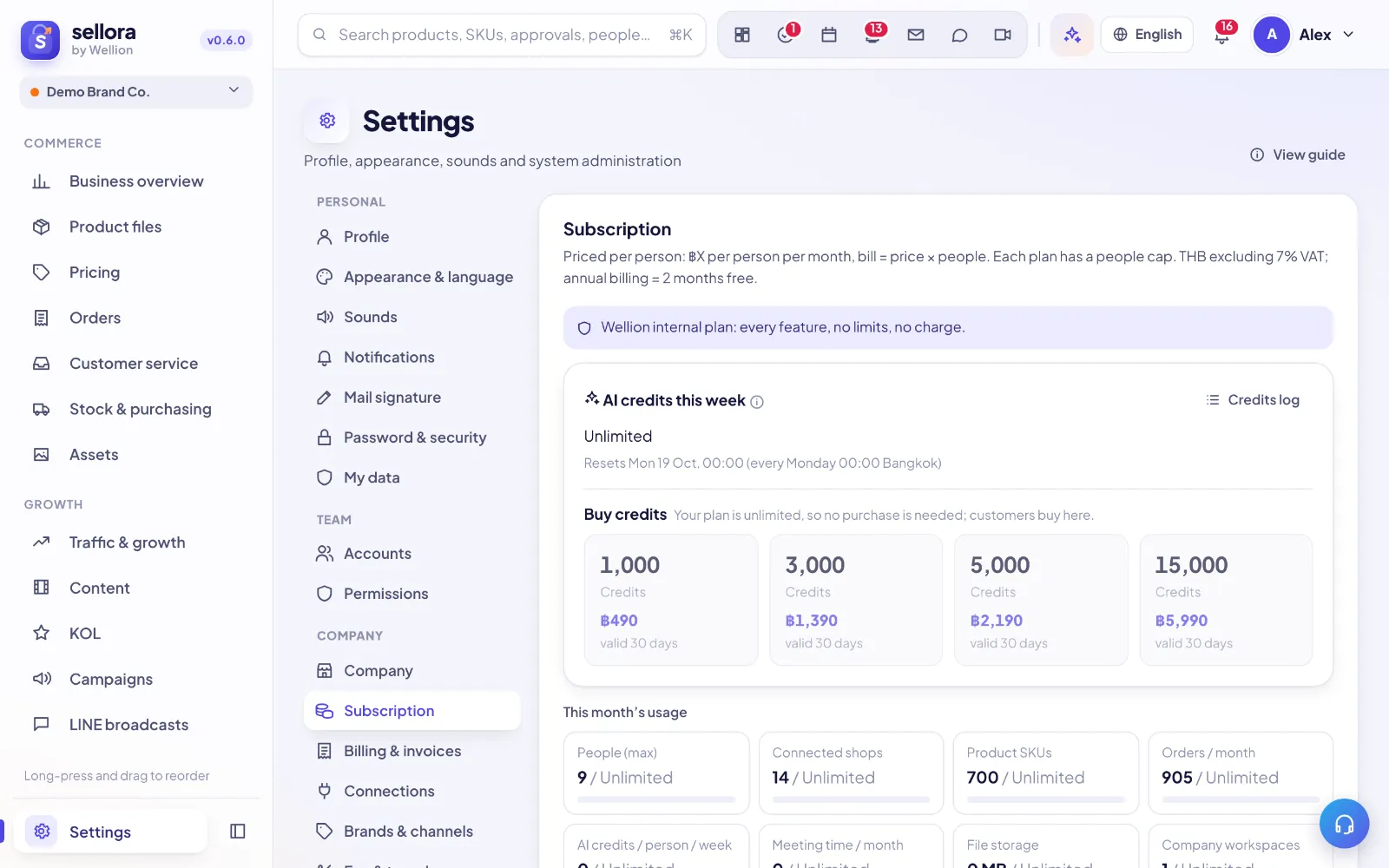
Prices are per person
Every plan is priced per person (seat) per month, in THB excluding 7% VAT. Your bill = plan price × people active in the workspace. One or two people is fine — there is no minimum bundle. Each plan has a maximum number of people (the founder counts).
| Plan | Price per person / month | Max people | Shops | SKUs | Orders / month | AI credits per person / week | Support |
|---|---|---|---|---|---|---|---|
| Free | 0 | 3 | 1 | 100 | 200 | none | Help center |
| Starter | 990 | 5 | 3 | 1,000 | 2,000 | 250 | Chat |
| Growth | 2,490 | 15 | 10 | 10,000 | 10,000 | 600 | Fast chat |
| Pro | 4,990 | 40 | 20 | 50,000 | 50,000 | 1,200 | Priority |
| Enterprise | quote | custom | custom | custom | unlimited | custom | Dedicated |
Example: Growth with 4 people = 4 × ฿2,490 = ฿9,960 / month (+ 7% VAT). All prices — plans, AI credit packs and add-ons — exclude 7% VAT; invoices add VAT as a separate line.. Yearly billing = 10 × the monthly price per person (two months free).
Shops, social accounts and LINE OA
| Plan | Authorized shops | Social accounts | LINE Official Accounts |
|---|---|---|---|
| Free | 1 | 2 | 1 |
| Starter | 3 | 5 | 2 |
| Growth | 10 | 15 | 5 |
| Pro | 20 | 40 | 10 |
| Enterprise | custom | unlimited | custom |
- Shops = stores authorized by API in Settings → Connections, all platforms together (Shopee, Lazada, TikTok Shop, Shopify, Shopline). You can authorize several stores on the same platform, each tied to one brand channel. Stores only listed (manual / BigSeller, no API) don't use a slot; revoking an authorization frees it.
- Social accounts = connected Facebook pages, Instagram and TikTok accounts. LINE OA = LINE Official Accounts set up for broadcasts and chat. Disconnect one to free a slot.
- At the limit, connecting another one is refused with a message that names the plan to upgrade to.
Extra shops add-on
Need more shops than your plan includes? Buy extra shops: ฿290 per shop per month (annual ฿2,900 per shop per year), excl. 7% VAT.
- Settings → Subscription → Add-ons (founder only): set the number of extra shops. Adding issues a prorated invoice for the days left in the current period, on its own line; the extra slots open once it is paid.
- Lowering the number applies at once (no refund for the current period; the next bill is lower). You can't go below the shops in use — revoke an authorization first.
- On renewal or plan change the add-on is billed as its own invoice line next to the per-person plan line.
- The Free plan can't buy add-ons — upgrade to a paid plan first.
Monthly order cap
Each plan includes a number of orders per calendar month (Bangkok time, counted by order date, from every source: shop sync, imports and manual orders). Settings → Subscription shows "Orders this month N / cap".
- Orders are never dropped: synced and imported orders beyond the cap are still saved, so finance and reports stay accurate.
- Beyond the cap, order processing is locked until the 1st of next month or an upgrade: manual orders, printing labels / packing lists / picklists, packing checks, courier handover and status changes.
- The founder is notified at 80% and at 100% (once each per month), and the Orders page shows a banner from 80%.
Adding and removing people
- Adding someone above the people you have paid for creates a prorated invoice for the days left in the current period.
- Removing someone lowers the bill from the next period (no refund for the current one).
- You can't go above the plan's maximum; upgrade first.
Is there a free trial?
There is no separate trial. Every sign-up starts on the Free plan, and you can upgrade any time in Settings → Subscription. Upgrading takes effect as soon as the invoice is paid; your data stays the same.
Free plan
Free is permanent: up to 3 people, 1 shop, no AI features and no data export. Upgrade any time to unlock them.
Upgrade, downgrade, cancel
- Settings → Subscription: choose a plan and monthly/yearly; the checkout shows people × price = total. Upgrades apply once the invoice is paid.
- If you use more than a lower plan allows (people, shops, SKUs), you will be asked to reduce first.
- Canceling stops renewal; you keep access until the period ends, then the workspace moves to Free.
Payment and invoices
- Settings → Billing lists invoices and receipts (plan, extra people, AI credit packs). Full tax invoices use the company name and tax ID from Settings → Company — check them before paying.
- Online payment (PromptPay / card) is being rolled out; until then our team can issue an invoice for bank transfer — open a ticket with category Billing.
- Refunds: plans are not refunded pro-rata after renewal, except where required by law; contact support for billing mistakes.
AI credits (weekly)
- Each paid plan gives every active person their own AI credits per week (Starter 250, Growth 600, Pro 1,200). You can only spend your own share, so one person can't use up everyone else's.
- Credits reset every Monday 00:00 (Bangkok time). Settings → Subscription shows your own credits, the workspace totals and (for founders / admins) a per-person table.
- Credits follow real model cost (1 credit = ฿0.10): an everyday AI call is usually 1 credit, a strong-model call at least 10. Cached repeats and failed calls are free.
- Ran out early? Paid plans get one free early reset per month (founder or settings admin; everyone's weekly credits reset; it is logged), or buy a credit pack (VAT excl., valid 30 days from payment):
| Pack | Price | About |
|---|---|---|
| 1,000 credits | ฿490 | 1 Starter person × 1 month |
| 3,000 credits | ฿1,390 | 1 Growth person × 1 month |
| 5,000 credits | ฿2,190 | 1 Pro person × 1 month |
| 15,000 credits | ฿5,990 | heavy use |
- A pack belongs to the workspace and is split evenly across the people active when it is paid. If someone joins or leaves while it is valid, the credits left are re-split evenly over the new headcount (credits already used stay with whoever used them).
- Each person uses their weekly credits first, then their pack share (the pack that expires soonest first).
- Settings → Subscription → Credits log lists every call: time, person, feature, model and credits, filtered by week, person and feature.
Inside SellerTiger, press the headset button to ask the AI assistant or open a support ticket.