
Connect BigSeller (ERP)
BigSeller is the data bridge for shops that aren't connected directly yet (Shopee, Lazada, TikTok Shop, Shopline, LINE MyShop…). Once connected, SellerTiger pulls products → stock → orders → settlements automatically every day (read-only).
What you get
- Data: products and images, stock and daily stock snapshots, orders (incremental by update time), settlement details. Covers every shop BigSeller manages.
- Frequency: daily at 06:00 (Bangkok time) by default. Change it to hourly / weekly / off in Data Center → Orders → BigSeller, or click Run now.
- First run: pulls the last 60 days and is slow (see the rate limit below). If it's interrupted, the next run picks up where it left off.
- Lock: while BigSeller is connected, manual BigSeller imports are locked (to avoid duplicates); for directly connected shops (e.g. Shopify), BigSeller no longer writes their orders.
- SellerTiger never changes orders, stock or prices in BigSeller.
Before you start
- Who does it: someone with level-4 access to Settings in SellerTiger (the founder by default).
- BigSeller's API is a paid service that needs approval. BigSeller has no self-serve open platform: contact BigSeller (your account manager or support) and apply for the "API access service". Once approved, BigSeller sends you an "API documentation" file; the access credentials at the top contain the app_id and app_key. (Checked against the official BigSeller blog on 2026-10-17: the API access service must be requested from BigSeller.)
- Don't upgrade your BigSeller plan to "speed it up". BigSeller allows 1 request per second per endpoint regardless of plan; SellerTiger already queues requests at that rate.
- SellerTiger must be opened on an https address (app.sellertiger.com) for the authorization redirect to work.
Step 1 · Credentials: enter app_id and app_key in SellerTiger
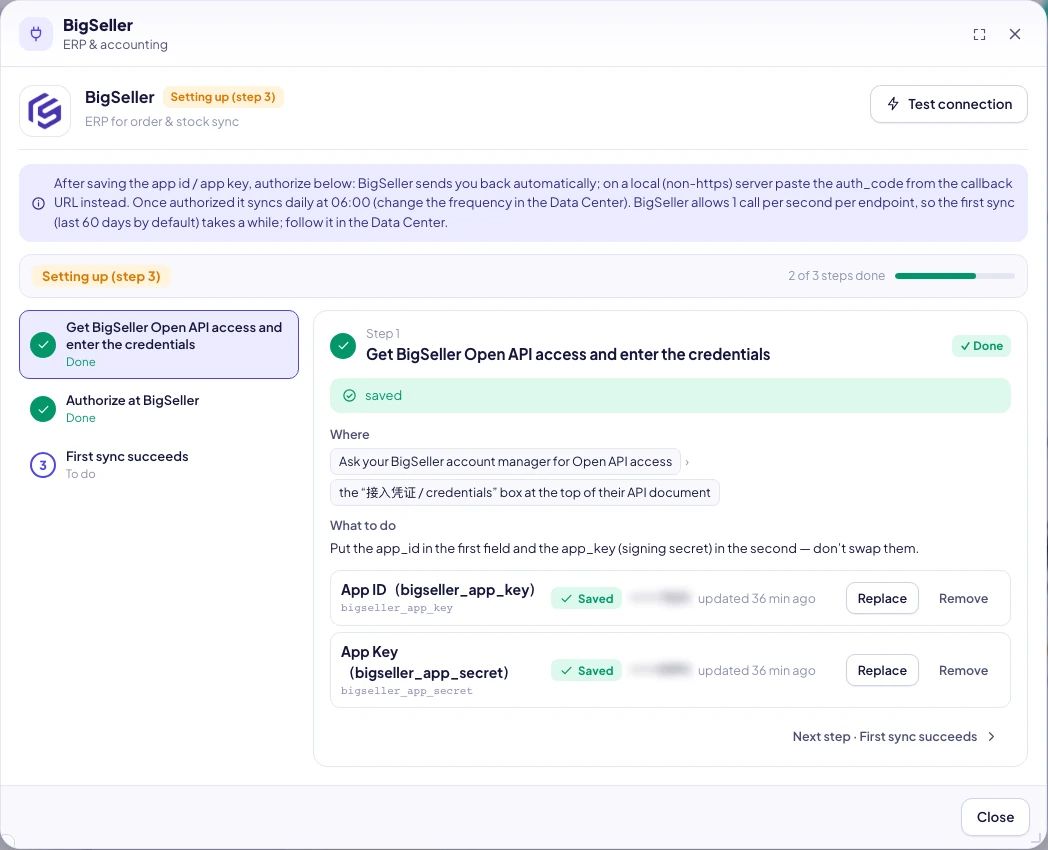
- Find the access credentials at the top of the API documentation BigSeller sent you:
app_idandapp_key. - SellerTiger → Settings → Connections → "ERP & accounting" → BigSeller.
- Under Keys:
- app_id → enter it in the
bigseller_app_keyfield → Save - app_key (the signing key) → enter it in the
bigseller_app_secretfield → Save - Don't swap the two fields. After saving, each row shows "Set here" and the first and last few characters, masked.
- app_id → enter it in the
- Click Test connection:
keys saved — not authorized yetis normal; authorize in the next step.
Step 2 · Encryption / Webhook: not needed
Step 3 · Permissions: enabled by BigSeller for the access scope you applied for
If one kind of data (settlements, for example) stays empty, ask BigSeller to confirm your API access scope includes it.
Step 4 · Callback: automatic
SellerTiger sends the callback URL https://app.sellertiger.com/api/bigseller/callback automatically; you don't enter it in BigSeller.
Step 5 · Authorize: approve in BigSeller
- In the same window, scroll down to BigSeller authorization & sync and click Authorize at BigSeller.
- Sign in on the BigSeller page and approve. You're sent back to SellerTiger with a success message.
- The authorization link is valid for 15 minutes and works only once; if it expires, click the button again.
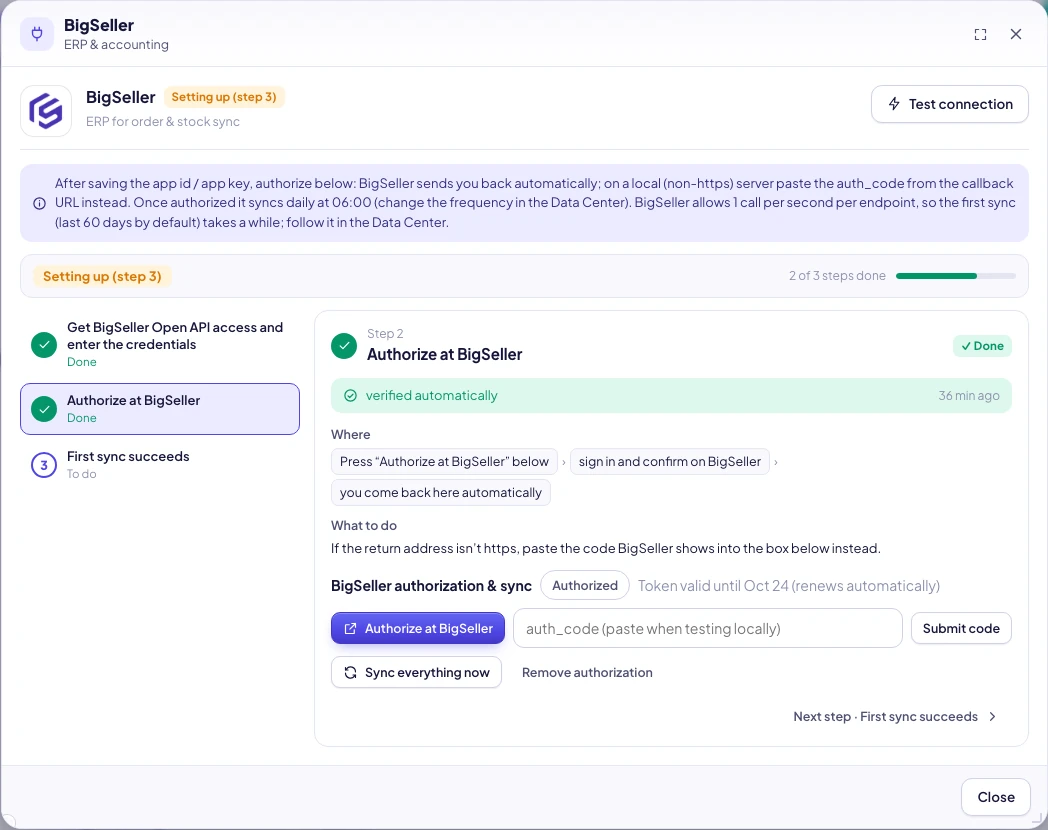
What success looks like: status Authorized, "Token valid until X (renews automatically)", and the BigSeller tile in Connections turns Connected. The token is valid for 7 days and renews automatically when less than 12 hours remain; nothing to do.
Step 6 · Turn on sync
- Click Sync everything now; you'll see "Sync started (products → stock → orders → settlement); the Data Center updates when done".
- Check progress and results in Data Center → Orders → BigSeller (transitional ERP): last run, record counts, the last-7-days cells.
- When it's done, check Orders and Inventory: orders show their shop and platform, and stock matches BigSeller; GMV on the Business overview is no longer 0.
- If orders show shops "Found in orders but not registered in Brands & channels", click Register to add them as sales channels.
Why the first run is slow
BigSeller allows each endpoint only 1 call per second. SellerTiger spaces calls a little over 1 second apart and runs them in order; on "too many requests" it waits and retries (up to 4 times). Settlement details for 60 days of about 6,000 orders take roughly 10–20 minutes. After that, the daily increments are small. This isn't a plan issue: upgrading your BigSeller plan won't make it faster.
No API yet: use BigSeller export files
While your API application is pending, you can export files from BigSeller and import them: Data Center → Orders → BigSeller → Upload myself → orders (in BigSeller: Orders → Order processing → Export → Export by SKU), stock, product SKUs, discontinued list, settlement details. Once the API is connected, imports are locked; the founder can backfill history from before the API connection.
Revoke authorization
Click Remove authorization in the window and confirm "BigSeller stops syncing and imports open again." Data already synced is kept.
Troubleshooting
| What you see / error code | Cause | What to do |
|---|---|---|
| Test shows keys saved — not authorized yet | Keys are saved but not authorized yet | Click Authorize at BigSeller |
| 40101002 (signature error) | The two fields are swapped, or a space was copied along | Put app_id in bigseller_app_key and app_key in bigseller_app_secret, then save again |
| 40101003 (invalid authorization code) | The authorization link is older than 15 minutes or was already used | Click Authorize at BigSeller again |
| 40101005 / 40101009 (token expired) | The token expired | It refreshes automatically; if it still fails, authorize again |
| 10100002 / 40101014 (too many requests / system busy) | BigSeller's 1-per-second rate limit | Nothing to do: SellerTiger retries automatically. Be patient on the first sync |
| BigSeller sign-in failed. Check the account and reconnect | The authorization callback failed | Make sure you use the BigSeller main account that has API access, then authorize again |
| This address is not https, so the redirect cannot be used | SellerTiger was opened on http or a local address | Open https://app.sellertiger.com and authorize again |
| Not configured yet — fill in the credentials first | You clicked authorize before entering the keys | Complete Step 1 first |
| This source syncs by API — this period can't be imported by hand | The API is connected, so imports are locked | No import needed; the founder uses backfill for history |
| Data Center shows "Failing (n in a row)" | Authorization expired or BigSeller's API returned an error | Hover to see the reason; authorize again, then Run now |
| Orders from a shop are missing | The shop isn't bound in BigSeller, or it's already connected directly | Bind it in BigSeller; directly connected shops get their orders from the direct connection |
Inside SellerTiger, press the headset button to ask the AI assistant or open a support ticket.