
Connect a Shopline store
You need two things: your admin address (the link in the browser bar) and the credential shown on the Shopline app page. You don't have to find any "handle" — paste the address and SellerTiger recognizes the shop. Only read access is requested; nothing in your store is changed.
Note (checked 2026-10-18): Connecting and Test connection work today, and product listing data reads products from your store. The direct Shopline order feed isn't live yet: after you authorize, orders keep coming from Shopline export files (Orders → Order Management → Export Orders Report) or BigSeller, Data Center shows "authorized · feed pending", and imports aren't locked.
Note: This connection has nothing to do with LINE webhooks. If Shopline manages your LINE OA, the webhook in LINE Developers belongs to Shopline — don't change it. See Connect LINE OA.
Before you start
- Who: someone with Settings level 4 in SellerTiger; on Shopline, an account that can manage apps (store admins can).
- Brands & channels: the brand has a Shopline sales channel (or a website channel running on Shopline).
- Plan: the store uses one authorized-shop slot.
Step 1 · Create the app in Shopline and tick scopes
- Shopline admin → Apps → Develop apps → Create app (any name, e.g.
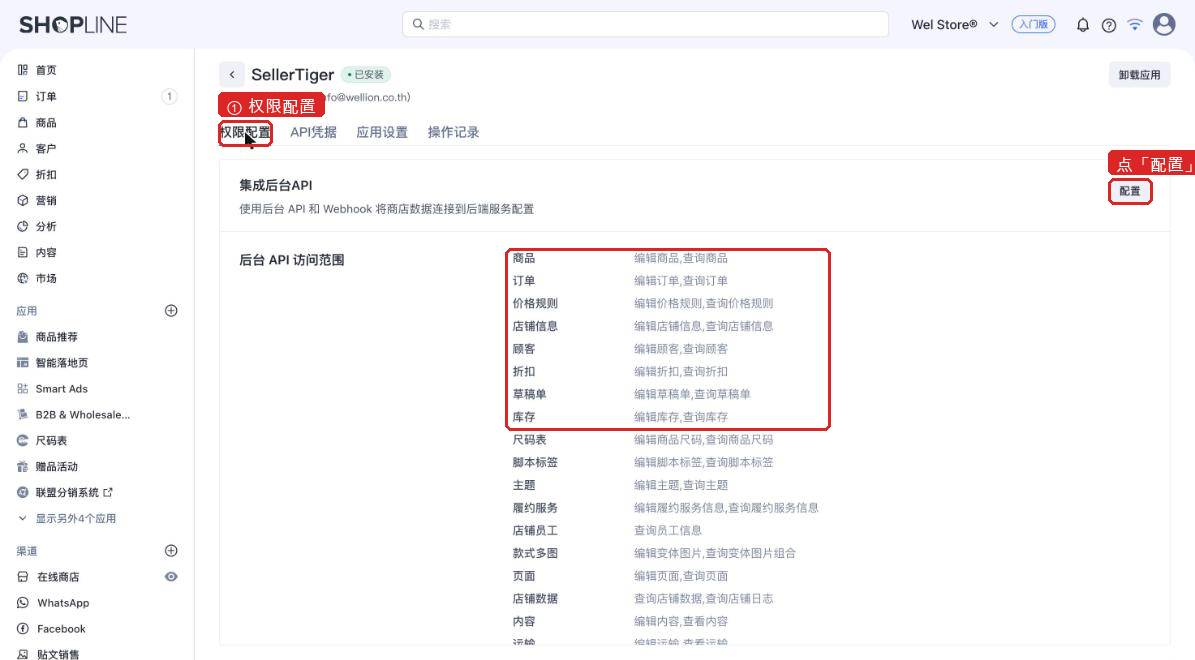
SellerTiger). The first time, accept the terms and enable development. - Open your app → Permissions (权限配置) → next to "Integrate Admin API" press Configure (配置) → tick Orders, Products, Inventory (also Store information so we can show the shop name) → Save.
Step 2 · Install the app and copy the access token
- Switch to API credentials (API凭据) → press Install app.
- The chip "Installed" (已安装) appears next to the app name, with "Uninstall app" top right — the access token only exists once you see "Installed".
- In Admin API access token (valid 3 years) press the eye icon (Shopline may email you a verification code) → Copy.
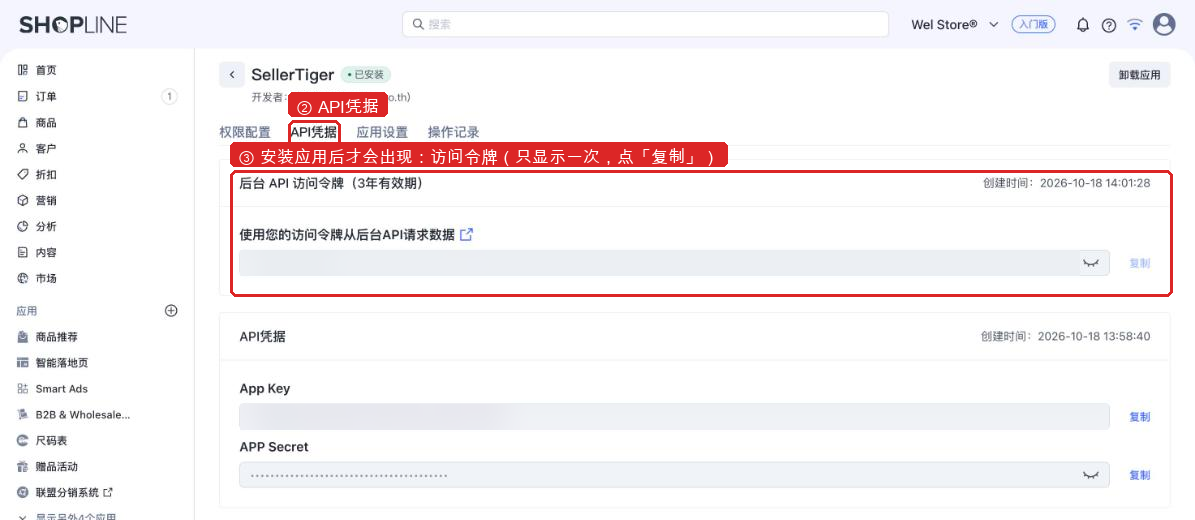
Only see App Key / App Secret? You haven't pressed Install app yet. Press it and the token appears. Or skip installing: paste both the App Key and App Secret into SellerTiger and connect with "Authorize on Shopline" (Step 4).
The token is shown once and is valid for 3 years. If you lose it, Uninstall app and install again (you get a new token). Changing scopes keeps the same token.
Step 3 · Paste the address and token in SellerTiger
- SellerTiger → Settings → Connections → Shopline. Under wizard step 3, press Connect on the shop (no shop yet? Add shop first).
- ① Shop admin address: paste the whole browser-bar link from the Shopline admin, e.g.
https://welstore2024.myshopline.com/admin/.... You'll see "Shop recognized: welstore2024.myshopline.com". - ② Admin API access token: paste the token → Connect and verify. SellerTiger really reads your orders once; only then does it say "Connected: shop name".
Step 4 · Alternative: authorize with App Key + App Secret
- In the Shopline developer center, add the redirect URL SellerTiger shows,
https://app.sellertiger.com/api/stores/oauth/shopline/callback, to your app's App callback URL (it must match exactly). - In the shop window paste the App Key in ② and the App Secret on the right → Authorize on Shopline.
- Approve on the Shopline page; you come back to SellerTiger automatically ("Shop authorized"). This token lasts 10 hours and SellerTiger renews it automatically.
Step 5 · Check
- The shop shows Authorized; Test connection shows the shop name.
- Data Center → Website → Shopline shows authorized · feed pending; keep importing order export files.
Troubleshooting
| What you see | Why | What to do |
|---|---|---|
| Can't tell which Shopline shop this is | You pasted your own custom domain (e.g. www.xxx.com) | Paste the https://xxx.myshopline.com/admin/... link from the admin's browser bar |
| This looks like an App Key, not an access token | The app isn't installed yet | Press "Install app" to get the token, or paste the App Secret too and authorize |
| Shopline rejected this access token | Incomplete copy, extra spaces, or the app was uninstalled / reinstalled | Copy it again from the app page |
| The token works but the app may not read orders | Orders not ticked in Permissions | Tick Orders / Products / Inventory, save, press Connect again (token unchanged) |
| Shopline can't find this shop | Wrong address | Copy the admin's browser-bar link again |
| Shopline says the callback URL doesn't match | App callback URL missing or different | Paste the redirect URL SellerTiger shows, exactly |
| Shopline did not grant access | App Key / Secret don't match, or the code is older than 10 minutes | Check them and authorize again |
| "Develop apps" isn't visible | Your account can't manage apps | Ask a store admin |
| That is a shoplineapp.com admin | The HK/TW SHOPLINE edition — a different system from myshopline.com | Not supported yet; use export files |
Note: Advanced: global access token (legacy) in the Shopline window is the old approach where the whole workspace shared one token. For new setups, connect each store as described above.
Inside SellerTiger, press the headset button to ask the AI assistant or open a support ticket.