
Connect a Lazada shop (Open Platform · self-developed app)
Authorize your Lazada shop in SellerTiger with the self-developed (Seller In-house) app you created on Lazada Open Platform. SellerTiger only reads shop data.
Note (checked 2026-10-17): Authorization and Test connection work today; the direct Lazada order feed isn't live yet. After you authorize, orders keep coming from Lazada export files or BigSeller, and Data Center shows "authorized · feed pending". When the direct feed goes live, the shop switches over automatically with no duplicate orders.
What you get
| Today | Once the direct feed is live |
|---|---|
| Shop authorization, tokens stored encrypted and renewed automatically, Test connection reads the shop name | Orders pulled automatically (hourly by default); imports and manual entry for this shop are skipped automatically |
| Orders / inventory / settlements: use Lazada export files or BigSeller | — |
Before you start
- Who does this: someone with level-4 Settings permission in SellerTiger (the founder by default). On the Lazada side, use the shop's Seller Center account.
- Brands & channels: the brand already has a Lazada sales channel under Settings → Brands & channels.
- Plan: each authorized shop uses one slot (extra slots ฿290 / month per shop, excl. VAT).
- Review: Lazada reviews self-developed apps (allowlist). The time varies, so allow a few days.
Step 1 · Credentials: get the App Key and App Secret on Lazada Open Platform
- Sign in at open.lazada.com with your Seller Center account and register as a developer, choosing Self-developed.
- Go to App Console → Create App, choose the type Seller In-house APP, describe the purpose clearly (read your own shop's orders, products and inventory into SellerTiger) and submit it for review.
- Once approved, open the app management page → Advanced Information (on some accounts it's under App Overview) and copy the App Key and App Secret.
Step 2 · Encryption / webhook: not needed
SellerTiger doesn't use Lazada push notifications.
Step 3 · Permissions: use the app's default permissions
A Seller In-house APP can read its own shop's orders, products, inventory and finance by default. IM chat and reviews need extra approval from Lazada, and SellerTiger doesn't use them yet.
Step 4 · Callback: add the shop in SellerTiger and fill in the Callback URL
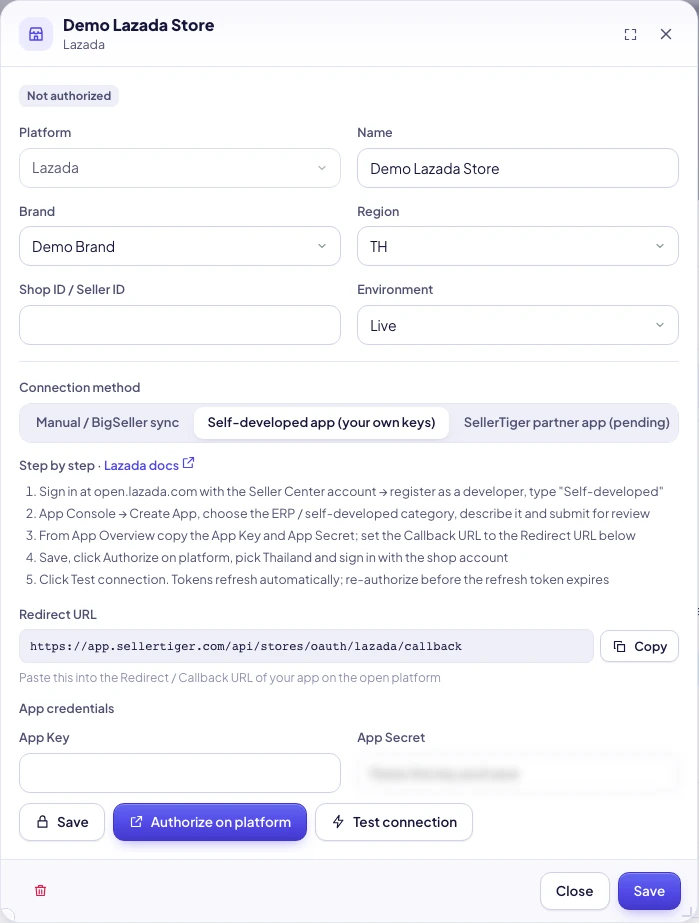
- In SellerTiger, go to Settings → Connections → Lazada → click Add & connect next to the shop (or Add shop).
- Fill in Name, Brand, Region (TH / MY / SG / PH / VN / ID; choose TH for a Thai shop) and Environment (Live).
- Under Connection method, choose Self-developed app (your own keys) → Save.
- Under App credentials, enter the App Key and App Secret → Save.
- Copy the Redirect URL:
https://app.sellertiger.com/api/stores/oauth/lazada/callback. Go back to Lazada App Console, paste it exactly as is into the app's Callback URL, and save.
Step 5 · Authorize: approve on Lazada
- Click Authorize on platform. Lazada's authorization page opens in a new tab.
- First choose the country Thailand (or the country where your shop is), then sign in with the shop account and approve.
- Back in SellerTiger you see "Shop authorized", and the shop shows Authorized.
Lazada's authorization code can be used only once and is valid for 30 minutes, so finish in one go.
Step 6 · Turn on sync: check
- Click Test connection. You should see "Connected" with the shop name.
- Data Center → Marketplaces → Lazada: the shop shows authorized · feed pending.
- Until the direct feed is live, bring orders in with Lazada export files (Orders → Manage Orders → Export all; Finance → My Income → Transaction Overview) or BigSeller.
Tokens and renewal
- Live apps: the access token lasts about 30 days and SellerTiger refreshes it automatically. The refresh token lasts about 180 days; click Re-authorize on the shop before it expires.
- Changing the App Key / Secret clears the old tokens, and you need to authorize again.
Troubleshooting
| Message you see | Cause | What to do |
|---|---|---|
| Some required fields are empty | The App Key or App Secret is empty | Fill in both |
| Not configured yet — fill in the credentials first | The connection method is "Manual / BigSeller sync", or the credentials weren't saved | Switch to Self-developed app and save |
| Lazada page says redirect_uri doesn't match | The Callback URL doesn't match the SellerTiger redirect URL | Paste exactly the same address in App Console (https, no extra slash) |
| Platform authorization failed | Lazada couldn't issue a token: wrong App Secret, app not approved yet, or the authorization code expired | Check the keys and app status, then click Authorize on platform again |
| The platform returned an error · (followed by Lazada's error code) | Wrong country chosen during authorization, or the token is no longer valid | Re-authorize and choose the right country |
| Couldn’t refresh the platform connection. Authorize it again | The refresh token expired | Click Re-authorize |
| Authorization expired — please try again | Authorization took longer than 30 minutes | Click Authorize on platform again |
| You’ve reached your plan’s limit of authorized shops | No shop slots left | Upgrade or buy extra slots |
| SellerTiger partner authorization isn’t open yet — use Self-developed app | You chose partner authorization | Switch to Self-developed app |
| This brand has no such channel turned on | The brand has no Lazada channel | Add it in Brands & channels |
SellerTiger partner one-click authorization
SellerTiger is applying for Lazada ISV status (this requires a Service Market listing and a security review). Until it's approved, the option shows "pending".
Inside SellerTiger, press the headset button to ask the AI assistant or open a support ticket.