
Connections overview (shops, ERP, couriers, LINE, Lark, Google, social media)
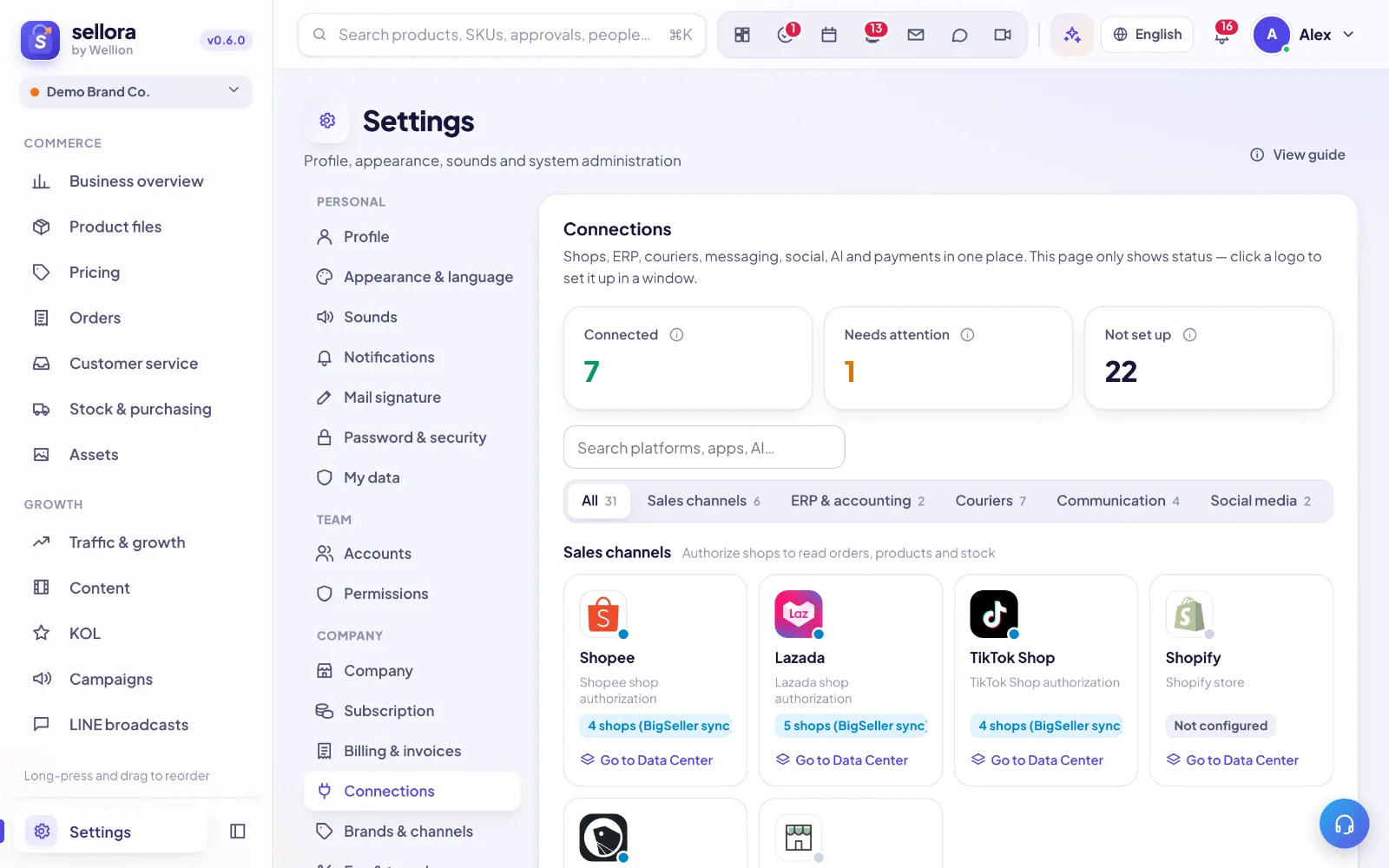
Settings → Connections puts your shops, ERP, couriers, LINE, Lark / Google, and social media accounts on one page. The page only shows status; click a tile to open its setup window. Each connection has a step-by-step guide (see the table at the end).
 12345
12345- Status — how many connections are connected, need attention, or aren't set up.
- Search — find a platform, app, or service.
- Categories — Sales channels, ERP & accounting, Couriers, Communication, Social media, AI models.
- Platform tiles — click to open the setup window.
- View guide — opens the matching guide.
Who can use it
- Only people with Settings permission level 4 can see and use this page (by default, the founder).
- First add the sales channels / social media channels for your brand in Settings → Brands & channels, then come back here to connect them. Without a channel, "Add shop" is grayed out and the tile says "Add this sales channel in Brands & channels first". "n channels to connect" on a tile means some channels still have no account connected.
Shared numbering for setup steps
Every connection's setup window and guide use the same step numbers. Steps that don't apply say "Not needed" or "Done by SellerTiger":
| Step | What you do | Examples |
|---|---|---|
| 1 Credentials | Get the keys from the other service's console and enter them in SellerTiger | Shopee Partner ID / Key, BigSeller app_id / app_key, LINE Channel secret / access token, courier API key |
| 2 Encryption / webhook | Encryption policy or push settings | Most connections don't need this; LINE's webhook belongs to your shop platform — don't change it |
| 3 Permissions | Select the permission scopes in the other service's console | TikTok Shop API scopes, Shopify / Shopline read permissions |
| 4 Events / callback | Enter SellerTiger's callback URL in the other service's console | https://app.sellertiger.com/api/stores/oauth/<platform>/callback |
| 5 Publish / authorize | Approve the authorization on the other service's page (or publish the app) | Authorize on platform, Authorize at BigSeller |
| 6 Turn on sync | Test it and start bringing data in | Test connection, Sync now, Turn on interop in one click, Connect account |
What each status means
| Status | Meaning | What to do |
|---|---|---|
| Connected (n shops connected / n accounts connected) | Working | Nothing |
| Incomplete n/m / Needs authorization / Connect an account | Some keys are filled in, or it isn't authorized / no account is connected yet | Open the window and continue with the next step |
| n shops (BigSeller sync) | Shops registered by hand; orders come in through BigSeller or imports | Normal; to connect directly, switch to "Self-developed app" |
| Error / n with errors | The last test or token exchange failed | Check "Last error" in the window and follow the guide |
| Expired / n expired | The token is past its validity | Click Re-authorize |
| Not configured | Not started yet | Follow the guide from Step 1 |
| Provided by SellerTiger | Lark / Google and similar are provided by SellerTiger's official app; your company doesn't enter any keys | The founder turns it on in one click, and each member connects their own account |
| Coming soon | SellerTiger's app is still launching or under review | Try again later |
The top of the window also shows "Last test: ✓ / ✗ time · details".
Three ways to authorize a shop
Choose under Connection method in the shop window:
- Manual / BigSeller sync — only registers the shop; orders come in through BigSeller or platform export files. It doesn't use a shop slot.
- Self-developed app (your own keys) — authorize with an app you created on the platform's open platform. Enter credentials → Save → Authorize on platform → Test connection.
- SellerTiger partner app (pending) — once SellerTiger is approved as a Shopee / Lazada / TikTok Shop partner, you authorize in one click; it can't be used until then. Shopify and Shopline don't have this option.
Shop slots: each "Authorized" shop (on any platform) uses one plan slot, and the top shows "{n} of {max} shops used". Manual / BigSeller shops don't use a slot; Revoke frees one up. If you run out of slots, upgrade or buy add-ons in Settings → Subscription (฿290 per shop per month, excluding 7% VAT).
Buttons on a shop row: Authorize on platform (Re-authorize once authorized), Test connection, Revoke (revokes the token so SellerTiger stops reading through the API; you can re-authorize any time), and the gear (edit).
How far each platform goes today (2026-10-17)
| Connection | Current status |
|---|---|
| Shopify | Direct orders are live |
| Shopee, Lazada, TikTok Shop, Shopline | You can authorize and test; direct orders aren't live yet, so orders use export files or BigSeller, and the Data Center shows "Authorized · feed pending" |
| LINE MyShop (LINE SHOPPING) | One Open API key per shop: paste it and test, then orders, products and stock sync automatically |
| BigSeller | Available (BigSeller must enable API access) |
| PEAK | Keys can be tested; receipts / expenses are imported from export files |
| Couriers | Keys can be saved; shipments are test waybills until live booking is turned on |
| LINE OA | Available |
| Lark, Google | Provided by SellerTiger: turn on in one click + each person connects their own account |
| Meta, TikTok posting | Provided by SellerTiger: just connect the account |
Step-by-step guides
| Tile | Guide |
|---|---|
| Shopee | Connect a Shopee shop |
| Lazada | Connect a Lazada shop |
| TikTok Shop | Connect a TikTok Shop |
| Shopify | Connect a Shopify store |
| Shopline | Connect a Shopline store |
| LINE MyShop | Connect LINE MyShop (your LINE SHOPPING shop) |
| BigSeller | Connect BigSeller |
| PEAK | Connect PEAK accounting |
| Couriers | Connect couriers |
| LINE OA | Connect a LINE Official Account |
| Lark | Connect Lark / Feishu |
| Google Workspace, Gmail / Lark Mail | Connect Google |
| Meta | Connect Facebook Pages and Instagram |
| TikTok (posting) | Connect a TikTok account |
| Where data comes from and how often it refreshes | Data Center |
Common issues
| Message you see | Cause | What to do |
|---|---|---|
| This platform is not set up in Brands & channels yet | There's no matching channel | Add it in Settings → Brands & channels first |
| You've reached your plan's limit of authorized shops | No slots left | Upgrade, buy add-ons, or revoke shops you don't use |
| Authorization expired — please try again | The authorization wasn't completed within 30 minutes of clicking authorize | Click authorize again |
| Platform authorization failed | The platform didn't send back a token (wrong keys, callback URL mismatch, app not approved) | Check Step 1 and Step 4 against the matching guide |
| The platform returned an error · details | The platform reported an error during the test | Read "details" and follow the troubleshooting in the matching guide |
| Can't reach the platform | Network or platform outage | Try again later |
| Couldn't refresh the platform connection. Authorize it again | Token renewal failed | Click Re-authorize |
SellerTiger only reads data. It never changes prices, messages buyers, or edits orders on the platform unless you explicitly turn that on in the relevant feature.
Inside SellerTiger, press the headset button to ask the AI assistant or open a support ticket.